Appearance
Operations
Starting the Daemon
bash
~/NAME/bin/relay start        # start as background daemon
~/NAME/bin/relay start -f     # start in foreground (logs to stdout)
The -f flag is useful for debugging — you'll see all log output in the terminal. Without it, the daemon detaches and logs to relay.log.
Stopping and Restarting
bash
~/NAME/bin/relay stop         # graceful stop (sends SIGTERM)
~/NAME/bin/relay restart      # stop then start
Checking Status
bash
~/NAME/bin/relay status # prints "running (pid NNN)" or "not running"Viewing Logs
bash
~/NAME/bin/relay log          # show last 20 lines
~/NAME/bin/relay log 50       # show last 50 lines
~/NAME/bin/relay log --watch  # tail -f the log
~/NAME/bin/relay log -w       # same, shorthand
Reloading Config
Edit relay.conf, then send a reload signal — no restart needed:
bash
~/NAME/bin/relay refresh # sends SIGHUP to the running daemonThe daemon re-reads relay.conf and applies changes to: LLM provider, workspace paths, Telegram settings, and memory config. Active sessions are preserved.
Validating Config
Before starting (or after editing relay.conf), validate the config:
bash
~/NAME/bin/relay config # parse relay.conf and print all valuesThis shows what the daemon will actually use — useful for catching typos and checking path expansion.
Updating the Daemon
When a new version is available, run from the source repo:
bash
cd relay
./update.sh              # update all registered agents
./update.sh kai          # update only the 'kai' agent
update.sh does the following for each agent:
- Rebuilds the daemon binary (
make clean && make) - Stops the running daemon
- Copies the new binary and control scripts
- Preserves all config, identity files (
SOUL.md,IDENTITY.md, etc.), data, and logs - Restarts the daemon
TIP
Config, sessions, transcripts, and identity files are never touched by update.sh. Only binaries and scripts are replaced.
Update with memory system:
bash
./update.sh --with-memory     # also refresh memory sidecar dependencies
./update.sh --without-memory  # remove the memory sidecar
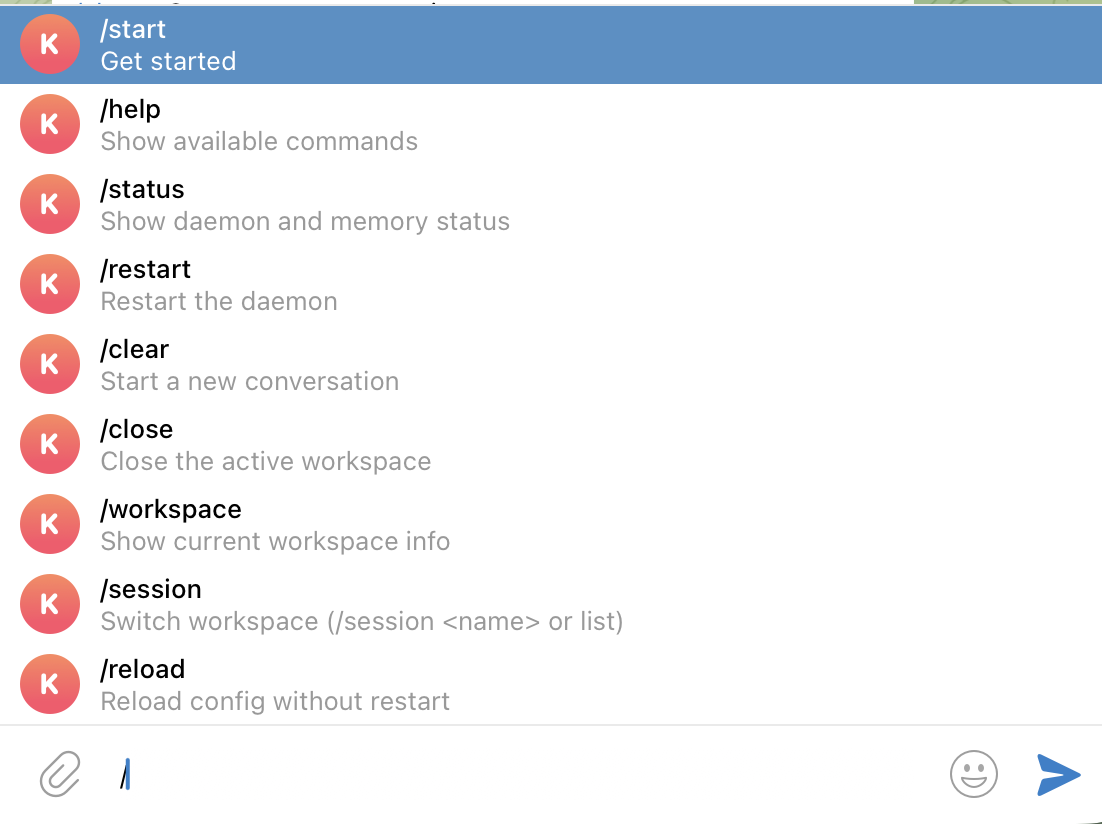
Telegram Commands
Once the daemon is running, send these commands in Telegram:
| Command | Description |
|---|---|
/start | Get started |
/help | Show available commands |
/status | Show daemon and memory status |
/restart | Restart the daemon |
/clear | Start a new conversation |
/close | Close the active space |
/space <name> | Switch space |
/spaces | List all spaces |
/session <number> | Select session from listing |
/sessions | Browse resumable sessions |
/workspace | Show current workspace info |
/reload | Reload config without restart |
/bus | Show recent agent bus activity |
Multi-Agent Setup
You can run multiple independent relay agents — each with its own identity, config, and Telegram bot.
The agent registry at ~/.relay maps agent names to home directories:
kai=~/kai
nova=~/nova
henry=~/henry
Each agent is installed separately with install.sh --name <name> --home <path> and controlled via its own ~/NAME/bin/relay script.
Agent Bus
Agents automatically discover each other and can exchange messages without human intervention. The agent bus is enabled by default.
How it works:
- When an agent starts, it advertises itself to
~/.relay.d/with its name, PID, and socket path - Every 60 seconds, each agent rescans the directory and discovers new peers
- When a user asks an agent to contact another (e.g. "ask Ash how he's doing"), the agent emits a bus directive in its response
- The daemon strips the directive from the Telegram message, sends it to the target agent's socket, and appends a status note
What you'll see in Telegram:
- When you tell Kai to message Ash, you'll see Kai's response with a note like "(sent message to Ash)"
- When Ash processes the message and replies, you'll get a notification:
[Bus] Ash → Kai: <response preview> - Use
/busto see the last 10 agent bus exchanges on demand
Offline persistence:
If the target agent's daemon is down when a message is sent, the message is saved to a dead drop (~/.relay.d/inbox/{agent}/). When that agent's daemon starts up, it processes the pending messages automatically and sends replies.
Troubleshooting:
bash
# Check which agents are advertising
ls ~/.relay.d/*.json

# Check an agent's advertisement
cat ~/.relay.d/kai.json

# Check for pending dead drop messages
ls ~/.relay.d/inbox/

# View bus activity log
cat ~/NAME/data/transcripts/agent-bus.jsonl | tail -10
Common Operations
Resetting a session
To start a fresh Claude conversation for a chat, delete the session entry from data/sessions.json, then send a new message.
Inspecting transcripts
Full message history is stored as JSONL files in data/transcripts/:
bash
ls ~/NAME/data/transcripts/
cat ~/NAME/data/transcripts/<chat_id>.jsonl | tail -20
Checking memory status
If the memory sidecar is enabled:
bash
~/NAME/bin/relay log --watch   # watch for "memory" entries in the log
curl http://localhost:8765/status  # check sidecar health